
Square
How do rewards work at the Square till?
Last updated 2026-11-26
Once rewards are switched on for Square, a ready reward comes off the sale by itself when staff add the customer. Shakewell then marks it as used.
Before you start
Rewards are not a setting in the dashboard yet. To have a reward applied at your Square till, talk to us or email support@shakewellwallet.com, and we will switch it on for you.
Once a reward is switched on, staff do not type in codes or find the right discount. They add the customer to the sale, and Square does the rest.
What happens
- A customer earns a reward, for example by filling a stamp card.
- Shakewell puts them in a Square customer group made for that reward. In your Square catalogue there is a matching discount whose name starts with Shakewell: and that only that group can get.
- Staff add the customer to the sale in Square POS. Square applies the discount by itself. The cashier does nothing extra.
- When the sale completes, Shakewell marks the reward as used and takes the customer out of the group.

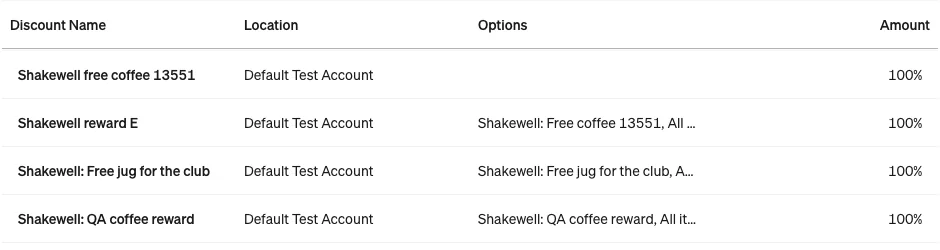
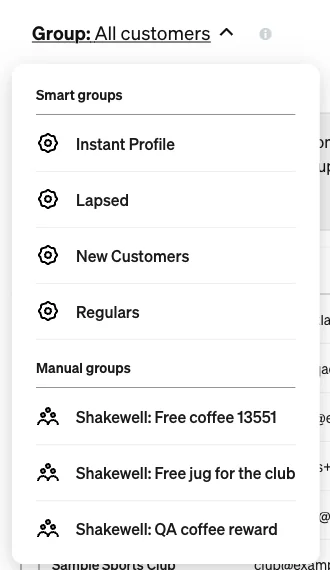
Which rewards work
- A percentage off, for example 10 percent off.
- A fixed amount off, for example a set amount off the sale.
- A free product. The discount is up to the reward's value, so a cheaper item is simply free.
- Free shipping does not apply at the till.
A reward is taken off once per sale. It applies to items from your Square catalogue. Custom amounts typed in without an item are never discounted.
Good to know
- The customer must be added to the sale. Without them, no discount applies.
- A customer uses one reward at a time. If they have another ready, it is available on a later sale.
- You can see a customer's rewards on their page under Customers, in the Rewards box, with each one marked Available or Redeemed.
- A sale that the reward makes free still counts. Shakewell marks the reward used even when nothing is paid.
- If you disconnect Square, the reward discounts and groups Shakewell made in Square are removed. Balances stay.
- If a customer's sale is refunded in full, you can choose to give the reward back. See refunds and reversals.

Next: refunds and reversals.