
Shared Loyalty Cards for Sports Clubs: One Card, One Club Balance
By Michael Chora · Published · Last updated · 5 min read
A shared loyalty card is one card that a whole group adds to their own phones. Every purchase made with it goes into a single points balance for the group, and the venue decides when a reward can be used. It suits a pub, café or brewhouse that sponsors local sports clubs: each club gets one card, its 100 or 500 members all carry it in Apple Wallet or Google Wallet, and the club earns together. In Shakewell Wallet you switch it on with one setting, and it works with Square at the till.
This guide shows how it works, step by step, with screenshots from a test club we set up: the Riverside Tigers Football Club.
How a shared club card works
- One card per club. You add the club once, as one customer, and issue it one card.
- Every member adds the same card. The club shares the add-to-wallet link with its members. The card works on any number of iPhones, and on Google Wallet the card is set up so many people can save it.
- One balance. When staff attach the club to a sale, the points go to the club's balance. Every phone holding the card shows the new total.
- Rewards need your approval. Anyone with the card can stand at the till, so a club reward never applies by itself. A manager approves it in the dashboard first.
Step 1: Turn on Shared card
Create a points card for clubs as you would any other card. Then open the card's page under Cards and switch on Shared card.

Every customer on this card is now treated as a group. If a club already had a reward waiting at the till, it is taken off the till straight away and waits for approval.
Step 2: Add the club and share its card
Add the club as a customer under Customer cards, choose the club card, and enter the club's name and a contact email, such as the club secretary's. The club gets one card, and Resend pass emails the add-to-wallet link to that contact to pass on to members.
Members open the link on their phone and add the card. This is the test club's card on an iPhone, with the club's points at the top:
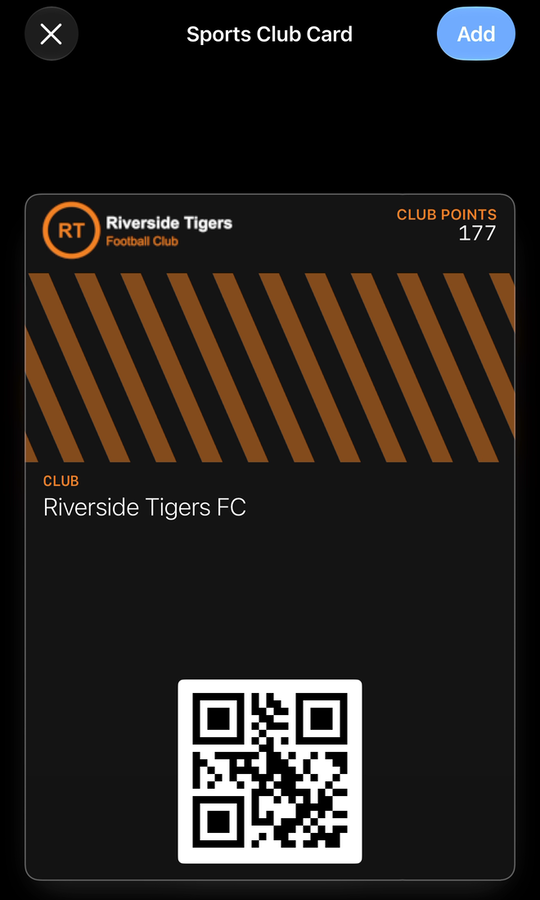
Because it is one card, the club counts once on your account, however many members carry it.
Step 3: Pool purchases with Square
Connect Square, then create a customer profile in Square for the club, using the same email as the club's card. When a member shows the club card at the till, staff attach the club's customer profile to the sale. The points go to the club automatically within a few seconds.
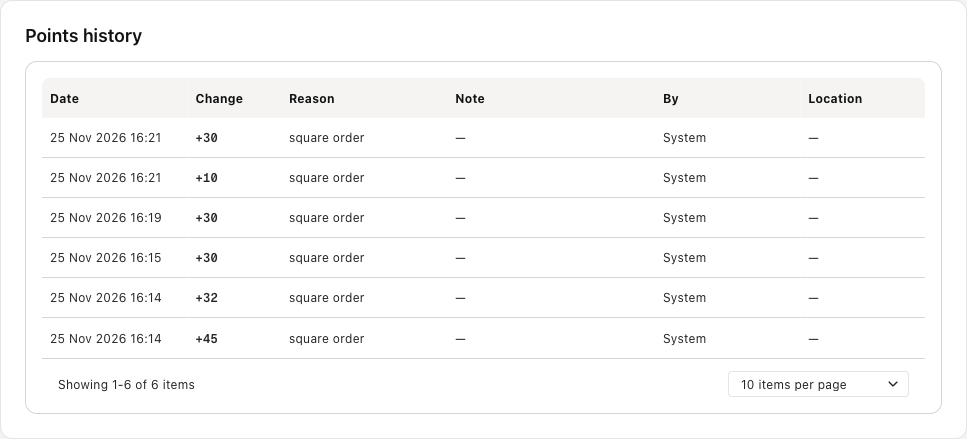
Here are six test sales from Square, all going to the one club balance:
Step 4: Approve rewards before they reach the till
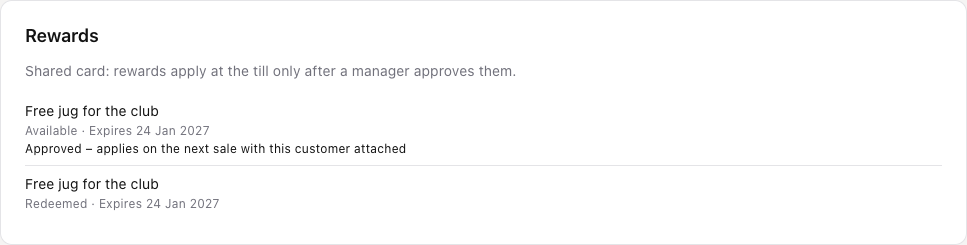
When the club earns a reward, it appears on the club's page in the dashboard with an Approve button. Until someone approves it, the reward does nothing at the till, so a member cannot use the club's reward without you knowing.
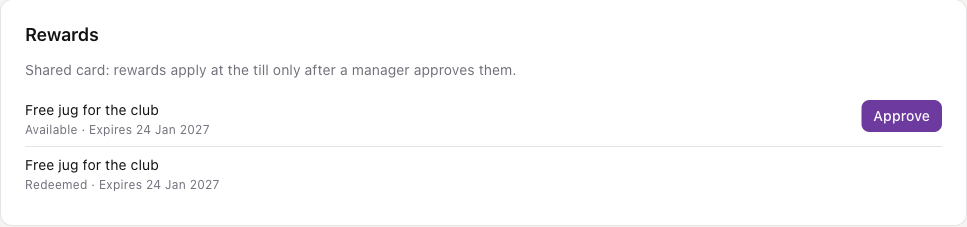
Click Approve when the club asks to use it, for example for a team dinner. The next sale with the club's customer profile attached gets the discount automatically in Square, and the reward is then marked as used. A second sale does not get it again.
If you use Shopify POS instead, staff need the POS manager permission to redeem a shared card's reward that has not been approved yet.
What a shared card does not do
- It does not track each member. The card belongs to the club, so you see the club's spend, not each person's. If you also want individual rewards, give members their own card as well.
- It does not stop people sharing the link. That is the point of it. Approval is what protects the rewards.
- It does not change how staff work at the till. In Square they attach a customer to a sale exactly as they do today.
Ideas for sponsoring local clubs
- A free jug or platter for the club table once the club reaches a points target.
- A percentage of the club's spend returned as a donation each season.
- Double points on game days, sent as a message to everyone holding the card.
For more ideas that work in a bar or brewhouse, see pub loyalty card ideas and our page for pubs and bars.
Why we think this is easier than the alternatives
Without a shared card you would need a separate loyalty account for every member and a spreadsheet to add them up, or a paper card for each club that one person has to carry. With Shakewell Wallet it is one setting, one card per club, and purchases add up on their own. Points and rewards are on the Growth plan, and the 60-day free trial includes them, so you can set up your first club before you pay anything. See pricing or sign up free.
Frequently asked questions
Can several people add the same loyalty card to their phones? Yes. With Shared card switched on, one card can be added to any number of iPhones and saved by many Google Wallet users, and every phone shows the same balance.
How do purchases get added to the club's balance? Staff attach the club's customer profile to the sale in Square, and the points go to the club's card automatically.
Can a member use the club's reward on their own? No. A shared card's reward does not apply at the till until a manager approves it in the dashboard, and it is used up on the next sale.
Does each member count towards my plan? No. The club has one card, so it counts once, however many members add it.
Does it work without Square? Yes. You can add points from the dashboard or by scanning the card, and Shopify POS staff need manager permission to redeem a shared card's reward that has not been approved.