
Points and rewards
How do I set up points expiry?
Last updated 2026-11-09
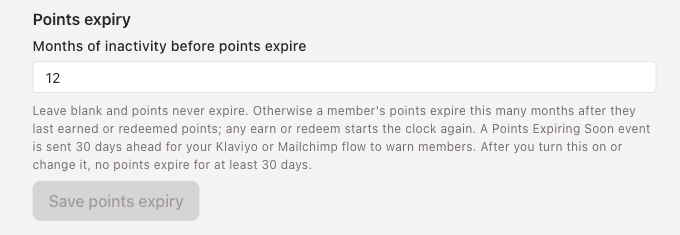
Open Rewards, then Points program, and enter the months of inactivity before points expire. Leave it blank and points never expire. Only account admins can change it.
What you need first
- An account admin login. For anyone else the box is switched off.
- A points program already set up. See the guide on points and earning rules.
- A decision on the length. Points expire when a member has not earned or redeemed for that many months.
Steps
- Sign in as an account admin. Only account admins can change points expiry.
- Open Rewards in the left menu, then Points program, and scroll to Points expiry.
- Enter the Months of inactivity before points expire, a whole number from 1 to 60.
- Choose Save points expiry.
- To switch expiry off, clear the box and save again. You see Points will not expire.
How it works
- Points never expire unless you set a number of months.
- A member's points expire that many months after they last earned or redeemed points. Any earn or redeem starts the clock again.
- A Points Expiring Soon event is sent 30 days ahead. In Klaviyo you can use it to start a flow that warns members.
- After you turn expiry on or change it, no points expire for at least 30 days.
If something goes wrong
- The box is switched off or the save fails: only account admins can change points expiry.
- The form says to enter whole months from 1 to 60: type a whole number in that range, or leave the box blank.
- The page says it could not load your points expiry: refresh and try again.
- Save points expiry is greyed out: you have not changed the value.