
Points and rewards
How do I set up points and earning rules?
Last updated 2026-11-09
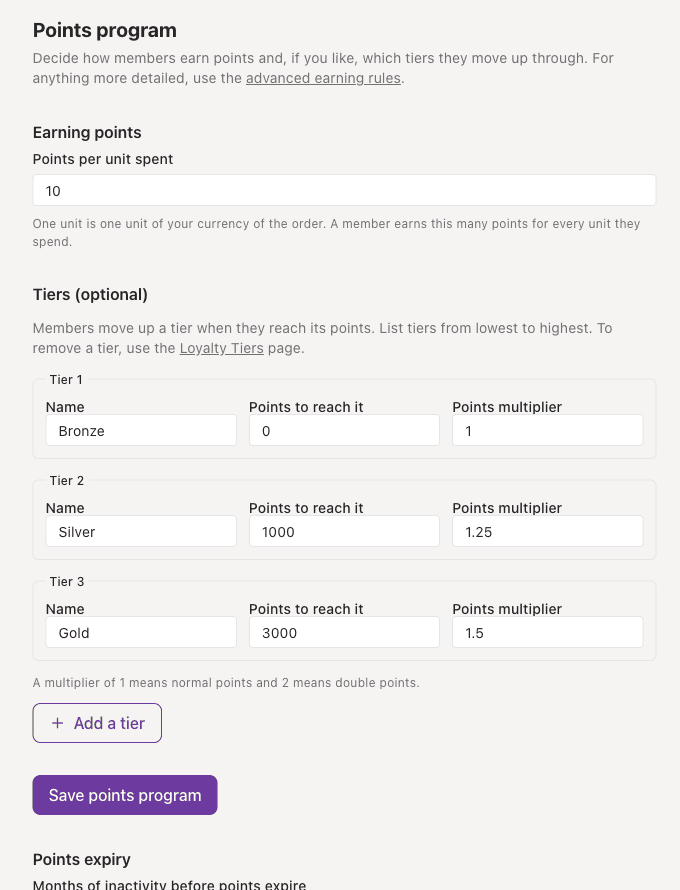
Open Rewards, then Points program, and set how many points a member earns for each unit they spend. Use Earning Rules for product, tier or bonus-period rates.
What you need first
- A published loyalty card, so there is something for members to earn on.
- The rewards engine switched on. An account admin can check it under Settings, then Engine. If Points program or Earning Rules is missing from the Rewards menu, ask us to check your plan.
- A way to record sales: a connected till or store such as Shopify, Square or WooCommerce, or staff adding points on the Scan page.
Steps
- Open Rewards in the left menu, then Points program.
- Under Earning points, enter Points per unit spent. It must be more than 0 and no more than 99.9999. One unit is one unit of your currency, so 10 means a member earns 10 points for every dollar they spend.
- If you want tiers, add them in the same form. The tiers guide covers that.
- Choose Save points program.
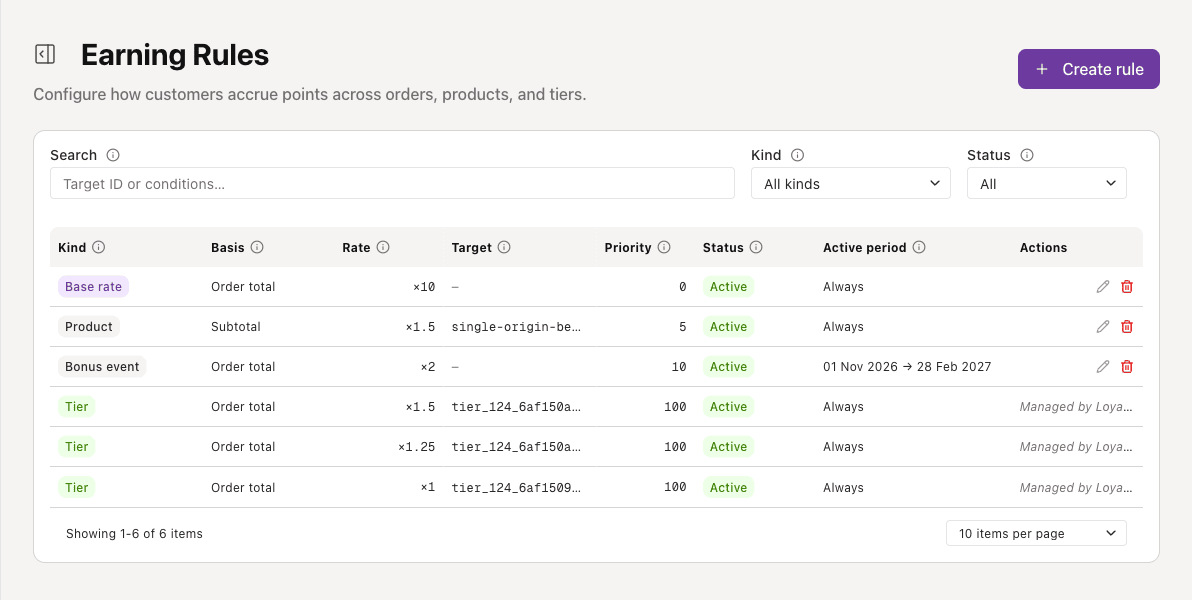
- For more control, open Rewards, then Earning Rules, and choose Create rule. Pick the kind of rule, how it counts the order, the rate, and the dates it should run.
Earning rules in more detail
An earning rule changes how many points an order earns. The rules are listed under Rewards, then Earning Rules, with a search and filters for kind and status.
- Base rate is the catch-all rate in points per dollar. Only one base rate can be active at a time, so switch the old one off before you turn a new one on.
- Product and Collection rules apply to one product or collection.
- Tier multiplier rules are created for you from your tiers, marked Managed by Loyalty Tiers, and cannot be edited here.
- Bonus event rules cover things that are not an order.
- Basis is the order amount the rate applies to: Order total includes tax and shipping, Subtotal is the items only, and Net takes off discounts.
- Stacking mode decides how rules combine. Multiplicative stacks them, so base rate times tier times product. Take max uses only the single best match at the same priority.
- Priority breaks ties. A higher number is checked first.
- Active from and Active until make a rule run for a set period. Status shows Active, Scheduled (on, but outside its dates) or Inactive.
If something goes wrong
- The form says to enter points per unit spent: the number must be more than 0 and no more than 99.9999.
- Members are not earning: check the sale has the customer attached (a Square sale with no customer earns nothing), that the rewards engine is on, and that the rule is Active and not Scheduled.
- You cannot turn on a second base rate: switch the existing one off first.
- A rule you expected to win did not: check its priority and its stacking mode.