
Points and rewards
How do customers redeem a reward at the till?
Last updated 2026-11-09
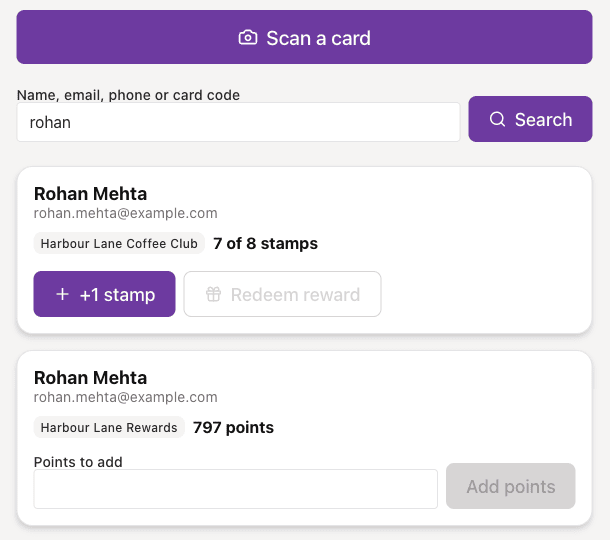
Find the customer, then redeem. On the Scan page choose Redeem reward on a full stamp card. In Shopify POS choose Redeem under Rewards. Square applies a ready reward to the sale.
What you need first
- A published card and a customer who holds it.
- For Shopify POS, the Shakewell tile set up on the POS. See the guide on Shopify POS.
- For Square, Square connected, with the customer attached to the sale. See the guide on connecting Square.
- Staff need permission to change cards to redeem on the Scan page.
Steps
- A customer fills their stamp card, or earns enough points for a reward.
- Staff find the customer. On the Scan page they scan the card or search by name, email, phone or card code. In Shopify POS they open the Shakewell tile.
- For a full stamp card on the Scan page, choose Redeem reward. The reward is handed over and the card starts again.
- In Shopify POS, choose Redeem next to the reward under Rewards. The reward is applied to the sale, so take payment as usual.
- With Square, attach the customer to the sale. A ready reward is applied by Square.
WooCommerce
When a stamp card completes and WooCommerce is the only till connected, Shakewell issues a WooCommerce coupon as the reward.
If something goes wrong
- Redeem reward is greyed out on the Scan page: the stamp card is not full yet.
- Redeem is greyed out in Shopify POS: the customer does not have enough points for that reward.
- You applied a reward by mistake in Shopify POS: choose Remove reward. If you do not see it, ask a manager, because your account may limit that to managers.
- A Square sale has no reward: sales with no customer attached earn nothing and cannot use a reward.
- Shopify POS says This card has been replaced or voided: ask the customer to use their new card.