
Getting started
How does a customer add a card to Apple Wallet or Google Wallet?
Last updated 2026-11-09
They open your signup link or scan your QR code, fill in the form and tap Add when their wallet opens. iPhone opens Apple Wallet and Android opens Google Wallet.
What you need first
- A published card with a signup page. See the guides on creating a card and building a signup page.
- Your signup link or QR code from the Share, QR & poster page.
- A phone with a wallet: Apple Wallet on iPhone or Google Wallet on Android. Samsung Wallet is not supported yet.
What the customer does
- The customer opens your signup link or scans your QR code.
- They fill in the form, tick the box to accept the terms and choose the button at the bottom.
- A page says their card is ready. It may show Preparing your pass for a moment.
- On an iPhone the page opens Apple Wallet by itself, and on Android it opens Google Wallet. They tap Add.
- If the wallet does not open, they choose Add to Apple Wallet or Add to Google Wallet on that page. On a phone the other wallet is a small link underneath.
- On a computer the page shows both buttons and a QR code. They scan the code with their phone camera to add the card to the phone.
Test it on your own phone
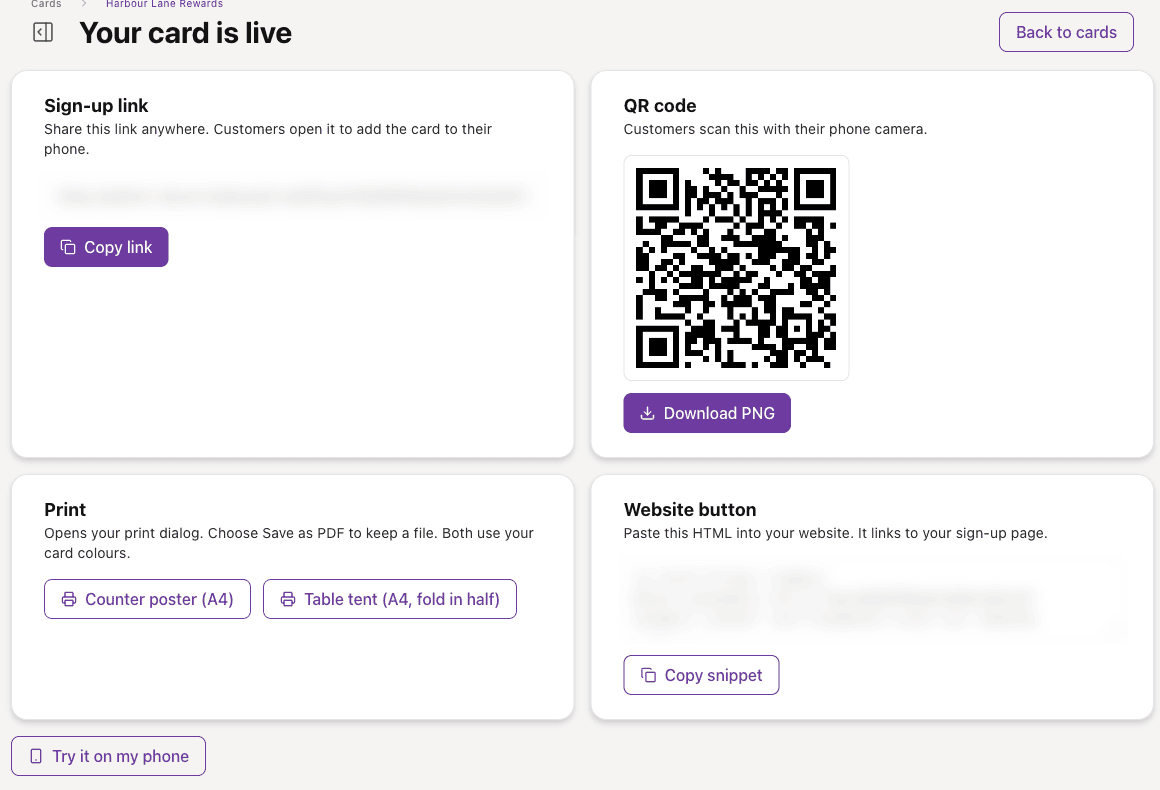
- On the Review step or the Your card is live page, choose Try it on my phone.
- Choose Add test pass to my Wallet on your phone, or scan the QR code with your phone camera.
- Tap Add.
If something goes wrong
- The buttons are greyed out: the pass is still being prepared. Wait a few seconds.
- The barcode is missing: it can take a few moments to appear. Refresh your wallet.
- The wallet did not open: choose Add to Apple Wallet or Add to Google Wallet on the page.
- The customer sees You already have this card: we email it to them if we have their address. Otherwise they should look in their wallet app.
- Cards that were never added to a wallet cannot receive messages and do not count as active passes.